Companies: Difference between revisions
Created page with "= Company creation = In Eclesiar, you'll be able to create your own company and gather some profits. At first, you'll need to go to '''My Places > Business'''. There will be a button called '''Create New Company''' below your job section. There's different types of companies. Some produce raw materials and some produce the final product. By clicking on that, this menu will pop up: right | 500px '''Food Raw Material''' (used for Food); ''..." |
Redesign Companies with original blue-and-gold artwork, clear work-mode guidance and verified creation, production and relocation rules |
||
| (8 intermediate revisions by 2 users not shown) | |||
| Line 1: | Line 1: | ||
= | __NOTOC__ | ||
<div class="eclesiar-wiki-guide" style="max-width:1100px; margin:0 auto; color:#24384c; line-height:1.65;"> | |||
<div class="eclesiar-guide-art" style="background:#102b43; border-bottom:4px solid #b99451; overflow:hidden; line-height:0;"> | |||
[[File:Eclesiar-companies-hero-2026.png|frameless|1100px|link=|alt=Eclesiar Companies. An ivory industrial harbor with a ledger, brass scales and gold coins.]] | |||
</div> | |||
<p style="font-size:18px; margin:20px 0 16px;">'''Companies''' turn work shifts into raw materials or finished goods. You can own them personally, or manage them for a country or [[Holding|holding]]. Their quality, location and operating costs all matter.</p> | |||
<div style="display:flex; flex-wrap:wrap; gap:16px; margin-bottom:20px;"> | |||
<div style="flex:1 1 300px; padding:16px 20px; box-sizing:border-box; background:#edf5fc; border:1px solid #d3e1ee; border-left:4px solid #327db6; border-radius:5px;"> | |||
<div style="font-family:Georgia,serif; font-size:21px; color:#173a57;">Employee work</div> | |||
<div>One paid shift per server day. Costs '''10 energy''', pays a wage and increases economic skill.</div> | |||
</div> | |||
<div style="flex:1 1 300px; padding:16px 20px; box-sizing:border-box; background:#f7f5ee; border:1px solid #e3dccb; border-left:4px solid #b99451; border-radius:5px;"> | |||
<div style="font-family:Georgia,serif; font-size:21px; color:#173a57;">Work as Manager</div> | |||
<div>Work selected companies in one action. Costs '''10 energy per action'''; each company has its own Gold charge. Does '''not''' increase economic skill.</div> | |||
</div> | |||
</div> | |||
<div style="display:flex; flex-wrap:wrap; gap:8px 20px; padding:12px 18px; margin-bottom:24px; border:1px solid #d6e3ef; background:#f5f8fb; border-radius:5px; font-size:14px;"> | |||
<div>[[#Create_a_company|Create & upgrade]]</div> | |||
<div>[[#Managing_staff|Staff & jobs]]</div> | |||
<div>[[#Work_as_Manager|Manager shifts]]</div> | |||
<div>[[#Production|Production]]</div> | |||
<div>[[#Relocation_and_trading|Relocation & trading]]</div> | |||
<div>[[#Before_you_invest|Planning checklist]]</div> | |||
</div> | |||
''' | <div style="background:#edf5fc; padding:14px 18px; margin-bottom:24px; border-left:4px solid #327db6;"> | ||
'''Know where the stock belongs.''' Inputs are taken from the '''company owner's inventory''', and output goes to that same owner: your account, the country or the holding. Companies do not have independent storage. Buying a company does not automatically include the seller's raw materials, finished goods or wallet. | |||
</div> | |||
== Create a company == | |||
''' | # Open '''Work → My Companies → Create company'''. | ||
# Choose who will own it: yourself, an eligible country or an eligible holding you manage. | |||
# Choose a production line, then a '''raw-material company''' or a '''factory'''. | |||
# Choose quality, enter a name and optionally add a logo. | |||
# Check the displayed '''region''' and Gold cost, then confirm. | |||
'''New companies are built in your current region.''' Creation does not include a destination-region picker, so choose your location before founding the company. The selected owner pays the creation cost. | |||
=== Company types and production chains === | |||
Raw-material companies produce resources without consuming another production item. Factories consume the matching raw material to produce finished goods. | |||
<div style="overflow-x:auto;"> | |||
{| class="wikitable" style="width:100%; margin:12px 0;" | |||
! Production line !! Raw-material company !! Resource !! Factory !! Finished product | |||
|- | |||
| Food || Farm || Grain || Food Factory || Food | |||
|- | |||
| Ground weapons || Iron Mine || Iron || Weapons Factory || Ground weapons | |||
|- | |||
| Aircraft || Titanium Mine || Titanium || Aerial Weapon Factory || Aircraft weapons | |||
|- | |||
| Tickets || Oil Well || Fuel || Airlines Company || Airplane tickets | |||
|} | |||
</div> | |||
=== Quality, creation costs and upgrades === | |||
Company quality runs from '''Q1 to Q5''', shown as stars. You may create a higher-quality company directly or upgrade an existing one. | |||
<div style="overflow-x:auto;"> | |||
{| class="wikitable" style="width:100%; margin:12px 0;" | |||
! Quality !! Create a new company !! Base upgrade from the previous quality | |||
|- | |||
| Q1 || 10 Gold || — | |||
|- | |||
| Q2 || 20 Gold || Q1 → Q2: 10 Gold | |||
|- | |||
| Q3 || 60 Gold || Q2 → Q3: 40 Gold | |||
|- | |||
| Q4 || 170 Gold || Q3 → Q4: 110 Gold | |||
|- | |||
| Q5 || 370 Gold || Q4 → Q5: 200 Gold | |||
|} | |||
</div> | |||
Use the company's '''Upgrade''' action and review its next quality and price. Eligible completed [[University|university studies]] can reduce the upgrade cost; use the amount shown in the confirmation. | |||
<div style="background:#f7f5ee; border-left:4px solid #b99451; padding:12px 16px; margin:18px 0;"> | |||
'''More stars do not always mean more units.''' A higher-quality raw company produces more raw material. A higher-quality factory produces higher-quality finished goods, usually in smaller quantities and with greater raw-material requirements. Compare the full recipe before upgrading. | |||
</div> | |||
== Managing staff == | |||
<div style="display:flex; flex-wrap:wrap; gap:22px; align-items:center; margin:16px 0;"> | |||
<div class="eclesiar-guide-art" style="flex:1 1 320px; min-width:0; overflow:hidden; border-radius:5px; line-height:0;"> | |||
[[File:Eclesiar-companies-management-2026.png|frameless|540px|link=|alt=A company office with an open ledger, payroll envelopes and a brass clock overlooking an industrial yard.]] | |||
</div> | |||
<div style="flex:1 1 400px;"> | |||
Open '''Manage''' to inspect the company and its '''Employees''', '''Job offers''' and '''Management''' sections. Review wages and work activity, post offers, adjust staff pay or dismiss employees. | |||
Personal owners manage their own companies. A country's President, Vice President and Minister of Labor can manage its companies. Holding management is available to its CEO, vice and managers; creating a holding company requires CEO or manager permission. | |||
</div> | |||
</div> | |||
=== Hiring and wages === | |||
[[ | * Set a '''gross wage''', the number of open positions and any minimum economic-skill requirement. | ||
* Follow the applicable '''minimum wage''' and permitted currency shown by the game. Ordinary job offers use the company region's ruling country's currency. | |||
* Keep enough wage funds, raw inputs and [[Storage|storage space]] in the owning account, country or holding. | |||
* Check employee activity before adding more positions: output per employee changes with how many employees have already worked in the company that day. | |||
An offer can be posted but remain unavailable on the [[Job Market]] if the employer lacks funds, materials or storage, if its currency is unsuitable, or if the owner's account is inactive or banned. Check the game's offer warnings. | |||
=== Employee work === | |||
To become an employee, find an eligible offer in the '''Job Market'''. You must satisfy its economic-skill and location requirements and have no existing job. You cannot accept a paid job in your own personally owned company. | |||
An employee may work '''once per server calendar day'''. A successful shift: | |||
* spends '''10 energy'''; | |||
* consumes the employer's required raw materials; | |||
* delivers production to the employer's inventory; | |||
* pays the worker the '''gross wage minus work tax'''; | |||
* increases the worker's stored '''economic skill'''. | |||
The next paid shift becomes available at '''midnight in server time'''. The game displays the remaining wait. Minimum wages and [[Taxes & Laws|work taxes]] are set through the country's [[Congress]]. | |||
'''Salary example:''' a gross wage of 25 with a 20% work tax pays the worker 20 in that currency. The employer still pays the full 25. | |||
For the broader employment guide, see [[Work]]. | |||
=== Economic skill reference === | |||
Economic-skill gains become smaller as stored skill increases. Before eligible study modifiers, the base increase uses: | |||
<pre>Base skill gain = 1 / (ln(S + 2) × D)</pre> | |||
'' | Here, '''S''' is the worker's current stored economic skill; '''ln''' is the natural logarithm. | ||
{| class="wikitable" style="width:100%;" | |||
! Current skill S !! Divisor D | |||
|- | |||
| S ≤ 30 || 5 | |||
|- | |||
| 30 < S ≤ 40 || 8 | |||
|- | |||
| 40 < S ≤ 50 || 10 | |||
|- | |||
| 50 < S ≤ 56 || 15 | |||
|- | |||
| 56 < S ≤ 60 || 20 | |||
|- | |||
| S > 60 || 30 | |||
|} | |||
= Work = | == Work as Manager == | ||
'''Work as Manager (WAM)''' is separate from your paid employee shift. In '''My Companies''', select the companies to work, review the inputs, output and '''Manager tax''', then choose '''Work as Manager''' and confirm. | |||
=== Energy and Gold === | |||
One submitted action costs '''10 energy in total''', even when it includes several companies. Gold costs are calculated '''separately for each selected company''' and paid by that company's owner. | |||
At the standard ×1 production setting, each company's paid shifts that day follow this base sequence: | |||
{| class="wikitable" style="width:100%;" | |||
! Paid WAM in that company today !! Base Gold charge, before work tax | |||
|- | |||
| First || 1 Gold | |||
|- | |||
| Second || 2 Gold | |||
|- | |||
| Third || 4 Gold | |||
|- | |||
| Fourth || 8 Gold | |||
|- | |||
| Further shifts || Continues doubling | |||
|} | |||
The production multiplier also scales paid WAM charges, and the applicable work tax is added. '''Use the displayed Manager tax for the amount payable.''' | |||
'' | The counter belongs to the '''company''', rather than the person clicking. Another authorized manager's paid shift in the same company advances it too. Working a different company uses that company's own daily counter. | ||
'''Two-company example:''' if neither company has had a paid WAM today, selecting both costs a base 1 + 1 = '''2 Gold''', plus applicable tax at ×1, and '''10 energy total'''. | |||
=== The daily personal free shift === | |||
An eligible free WAM waives the '''Gold charge and work tax'''. It still requires '''10 energy''', the raw materials and sufficient storage. | |||
* Select '''exactly one personally owned company'''. | |||
* Your account must not have used its daily free WAM. | |||
* That company must not have used its free WAM that day either. | |||
The free shift does '''not''' advance the paid-shift doubling counter. Selecting several companies does not qualify for this solo waiver. Country and holding companies do not receive the personal free shift. | |||
<div style="background:#edf5fc; border-left:4px solid #327db6; padding:12px 16px; margin:18px 0;"> | |||
'''Manager work has its own output rules.''' It does not increase economic skill and does not inherit employee skill, employee-count, resource-bonus or building production bonuses. Pollution, political modifiers, sale listings and recent relocation can still affect its output. | |||
</div> | |||
== Production == | |||
<div style="display:flex; flex-wrap:wrap; gap:22px; align-items:center; margin:16px 0;"> | |||
<div class="eclesiar-guide-art" style="flex:1 1 320px; min-width:0; overflow:hidden; border-radius:5px; line-height:0;"> | |||
[[File:Eclesiar-companies-production-2026.png|frameless|540px|link=|alt=An orderly blue and ivory industrial workshop with grain sacks, metal ingots, workers and finished supply crates.]] | |||
</div> | |||
<div style="flex:1 1 400px;"> | |||
'''Base production''' is the starting recipe, not a promise of the final yield. Employee work and manager work apply different modifiers. Check your selected work mode, required materials and available storage before confirming. | |||
''' | The tables below show base recipes at the '''standard ×1 production setting''', before output modifiers. A server production multiplier can scale both output and consumption. | ||
</div> | |||
</div> | |||
= | === Base recipe reference === | ||
<div style="overflow-x:auto;"> | |||
{| class="wikitable" style="width:100%;" | |||
! Base units per shift !! Q1 !! Q2 !! Q3 !! Q4 !! Q5 | |||
|- | |||
| Raw-material output || 19 || 39 || 58 || 78 || 97 | |||
|- | |||
| Food output || 60 || 49 || 38 || 27 || 16 | |||
|- | |||
| Ground-weapon output || 197 || 143 || 105 || 77 || 56 | |||
|- | |||
| Aircraft-weapon output || 90 || 65 || 47 || 34 || 25 | |||
|- | |||
| Airplane-ticket output || 40 || 29 || 21 || 15 || 11 | |||
|- | |||
| Raw input for a factory shift || 37 || 75 || 112 || 150 || 187 | |||
|} | |||
</div> | |||
' | The input row uses the factory's matching resource from its production chain. Raw-material companies consume no production input item. Eligible studies can modify employee production or its input cost; manager work uses its own recipe calculation. | ||
=== What affects employee output? === | |||
''' | {| class="wikitable" style="width:100%;" | ||
! Factor !! Effect | |||
|- | |||
| Company type and quality || Set the base recipe and the quality of finished goods. | |||
|- | |||
| Daily employee count || Includes player and NPC employee shifts already completed in that company today. WAM is excluded from this count. | |||
|- | |||
| Economic skill || Higher effective economic skill increases output. Active attributes may affect effective skill or manager leadership. | |||
|- | |||
| Regional resource bonus || Depends on the matching resource bonus of the company's region. | |||
|- | |||
| Owner-country resource bonus || Comes from the company owner's country: the account owner's nationality, owning country, or holding's country. It is not simply the worker's nationality or the country hosting the factory. | |||
|- | |||
| Pollution || Reduces output. See [[Pollution]]. | |||
|- | |||
| Production Fields || Add 5% per level to raw-material output. | |||
|- | |||
| Industrial Zone || Adds 5% per level to finished-goods output and also provides regional pollution relief. | |||
|- | |||
| Military Base || At level 3 or higher, adds a 5% production bonus for ground and aircraft weapons. | |||
|- | |||
| Resource Depots || Add 10% per summed depot level in visible regions ruled by the company owner's country. | |||
|- | |||
| Recent relocation || Halves output for three days after moving. | |||
|- | |||
| Company listed for sale || Halves output while listed. This can stack with the relocation penalty. | |||
|- | |||
| Studies and political effects || Relevant completed studies and country ideologies can change production or costs; eligibility depends on the owner and work mode. | |||
|} | |||
These effects include successive multipliers and rounding, so adding all percentages together does not reproduce the result. See [[Region Buildings]] and [[Political Ideologies]] for the related systems. | |||
=== Daily employee-count factor === | |||
The employee-count factor uses the number of employee shifts '''already completed''' before the next worker starts: | |||
<pre>Employee-count factor = 1.3 − min(previous employee shifts today, 10) / 10</pre> | |||
{| class="wikitable" style="width:100%;" | |||
! Next employee shift !! Factor before other modifiers | |||
|- | |||
| First || 130% | |||
|- | |||
| Second || 120% | |||
|- | |||
| Third || 110% | |||
|- | |||
| Fourth || 100% | |||
|- | |||
| Eleventh and later || 30% | |||
|} | |||
'''Example:''' before other effects, a base output of 100 becomes 130 for the first employee shift and 100 for the fourth. Hiring more people increases total production, but each additional shift can have a lower yield. | |||
NPC-owned factories have a separate adjustment: their finished-goods base output is reduced because those owners do not supply ordinary raw inputs. This is distinct from an NPC employee working for a player-owned company. | |||
== Relocation and trading == | |||
=== Move a company === | |||
''' | Use a '''Relocation Permit''' from [[Storage|My Storage]]. Choose a company of the permit's '''matching quality''', then the destination country and region. Review the effects and confirm. Merely opening the permit does not consume it. | ||
The move requires: | |||
''' | * management permission for the company; | ||
* a matching-quality permit in the acting player's inventory; | |||
* '''no player employees''' in that company; | |||
* a different, visible region in a playable country; | |||
* no active owner-relocation or recent-company-trade cooldown. | |||
''' | The action consumes '''one permit''', changes the company's region and removes its posted job offers. There is no separate Gold debit for the move itself; obtaining the permit has its own cost. Permits may be found in the [[Special items shop]] or [[Auctions]]. | ||
'' | '''After moving, production is halved for three days.''' The company also carries its recent production contribution to the destination's pollution; moving it does not erase its production history. | ||
=== Cooldowns and sale effects === | |||
''' | <div style="overflow-x:auto;"> | ||
{| class="wikitable" style="width:100%;" | |||
! Event !! Market or contract transfer !! Relocation / production effect | |||
|- | |||
| Buy a company on the Business Market || A '''7-day trade lock''' blocks resale and contract transfer. || Relocation normally waits '''30 days from the trade'''. | |||
|- | |||
| Receive a company through a contract || The transfer adds '''no new 7-day trade lock'''. Other existing restrictions still apply. || Relocation normally waits '''30 days from the trade'''. | |||
|- | |||
| Relocate a company || Relocation itself does not add the market's 7-day trade lock. || Output is halved for '''3 days'''; the same owner normally waits '''30 days''' before relocating another company. | |||
|- | |||
| List a company for sale || It is available for purchase while its listing remains active. || Output is '''halved while listed'''. | |||
|} | |||
</div> | |||
The normal '''30-day relocation waits are adjustable by game settings'''; use the game's actual remaining cooldown. The owner-wide wait belongs to the account, country or holding that owns the company. Moving one holding company therefore affects that holding's other companies too. | |||
A market purchase or contract transfer changes the company's owner, while keeping its location and employees. The previous owner's inventory and wallet are separate assets. Country and holding transactions may also need the approvals shown by the game. | |||
=== Delete a company === | |||
'' | Deleting a company removes its offers and sale listing, dismisses its employees and gives '''no Gold refund'''. Review the deletion confirmation carefully. | ||
== Before you invest == | |||
* '''Choose the work mode.''' Employee production and WAM have different yields and costs. | |||
* '''Compare quality and quantity.''' Higher-quality finished goods require more input and usually produce fewer units. | |||
* '''Fund the correct owner.''' Keep materials, wage currency, WAM Gold and storage in the account, country or holding that owns the company. | |||
* '''Check location.''' Resource bonuses, buildings, pollution and political effects can change the result. | |||
* '''Count the next shift's cost.''' Repeated paid WAM doubles per company each day. | |||
* '''Plan staffing.''' Daily employee-count effects make the next shift different from the first. | |||
* '''Check the listing and relocation state.''' Both can reduce output, and the penalties can stack. | |||
* '''Compare costs with expected sales.''' Creating or upgrading a company does not guarantee a profit. | |||
== Interface reference == | |||
' | These screenshots show example interfaces and values. Use the current game's controls and quotes for your own company. | ||
<gallery mode="packed" heights="140" style="margin:12px 0;"> | |||
File:Company menu.png|Company creation | |||
File:Company Upgrade.png|Upgrade confirmation | |||
File:Company manage staff.png|Employee management | |||
File:Work as manager.png|Manager-work example | |||
File:Jobs no job.webp|Finding a job | |||
File:Job offers.webp|Comparing job offers | |||
File:Company Relocation.webp|Relocation example | |||
</gallery> | |||
''' | <div style="border-top:1px solid #d6e1eb; padding:14px 4px 8px; margin-top:24px; color:#536b7e; font-size:13px;"> | ||
Rules reviewed against the game backend on '''12 October 2026'''. Production settings, studies, taxes and regional conditions can change the final quote. Related guides: [[Work]] · [[Job Market]] · [[Storage]] · [[Region Buildings]] · [[Pollution]]. | |||
</div> | |||
< | </div> | ||
Latest revision as of 17:19, 12 October 2026

Companies turn work shifts into raw materials or finished goods. You can own them personally, or manage them for a country or holding. Their quality, location and operating costs all matter.
Know where the stock belongs. Inputs are taken from the company owner's inventory, and output goes to that same owner: your account, the country or the holding. Companies do not have independent storage. Buying a company does not automatically include the seller's raw materials, finished goods or wallet.
Create a company
- Open Work → My Companies → Create company.
- Choose who will own it: yourself, an eligible country or an eligible holding you manage.
- Choose a production line, then a raw-material company or a factory.
- Choose quality, enter a name and optionally add a logo.
- Check the displayed region and Gold cost, then confirm.
New companies are built in your current region. Creation does not include a destination-region picker, so choose your location before founding the company. The selected owner pays the creation cost.
Company types and production chains
Raw-material companies produce resources without consuming another production item. Factories consume the matching raw material to produce finished goods.
| Production line | Raw-material company | Resource | Factory | Finished product |
|---|---|---|---|---|
| Food | Farm | Grain | Food Factory | Food |
| Ground weapons | Iron Mine | Iron | Weapons Factory | Ground weapons |
| Aircraft | Titanium Mine | Titanium | Aerial Weapon Factory | Aircraft weapons |
| Tickets | Oil Well | Fuel | Airlines Company | Airplane tickets |
Quality, creation costs and upgrades
Company quality runs from Q1 to Q5, shown as stars. You may create a higher-quality company directly or upgrade an existing one.
| Quality | Create a new company | Base upgrade from the previous quality |
|---|---|---|
| Q1 | 10 Gold | — |
| Q2 | 20 Gold | Q1 → Q2: 10 Gold |
| Q3 | 60 Gold | Q2 → Q3: 40 Gold |
| Q4 | 170 Gold | Q3 → Q4: 110 Gold |
| Q5 | 370 Gold | Q4 → Q5: 200 Gold |
Use the company's Upgrade action and review its next quality and price. Eligible completed university studies can reduce the upgrade cost; use the amount shown in the confirmation.
More stars do not always mean more units. A higher-quality raw company produces more raw material. A higher-quality factory produces higher-quality finished goods, usually in smaller quantities and with greater raw-material requirements. Compare the full recipe before upgrading.
Managing staff

Open Manage to inspect the company and its Employees, Job offers and Management sections. Review wages and work activity, post offers, adjust staff pay or dismiss employees.
Personal owners manage their own companies. A country's President, Vice President and Minister of Labor can manage its companies. Holding management is available to its CEO, vice and managers; creating a holding company requires CEO or manager permission.
Hiring and wages
- Set a gross wage, the number of open positions and any minimum economic-skill requirement.
- Follow the applicable minimum wage and permitted currency shown by the game. Ordinary job offers use the company region's ruling country's currency.
- Keep enough wage funds, raw inputs and storage space in the owning account, country or holding.
- Check employee activity before adding more positions: output per employee changes with how many employees have already worked in the company that day.
An offer can be posted but remain unavailable on the Job Market if the employer lacks funds, materials or storage, if its currency is unsuitable, or if the owner's account is inactive or banned. Check the game's offer warnings.
Employee work
To become an employee, find an eligible offer in the Job Market. You must satisfy its economic-skill and location requirements and have no existing job. You cannot accept a paid job in your own personally owned company.
An employee may work once per server calendar day. A successful shift:
- spends 10 energy;
- consumes the employer's required raw materials;
- delivers production to the employer's inventory;
- pays the worker the gross wage minus work tax;
- increases the worker's stored economic skill.
The next paid shift becomes available at midnight in server time. The game displays the remaining wait. Minimum wages and work taxes are set through the country's Congress.
Salary example: a gross wage of 25 with a 20% work tax pays the worker 20 in that currency. The employer still pays the full 25.
For the broader employment guide, see Work.
Economic skill reference
Economic-skill gains become smaller as stored skill increases. Before eligible study modifiers, the base increase uses:
Base skill gain = 1 / (ln(S + 2) × D)
Here, S is the worker's current stored economic skill; ln is the natural logarithm.
| Current skill S | Divisor D |
|---|---|
| S ≤ 30 | 5 |
| 30 < S ≤ 40 | 8 |
| 40 < S ≤ 50 | 10 |
| 50 < S ≤ 56 | 15 |
| 56 < S ≤ 60 | 20 |
| S > 60 | 30 |
Work as Manager
Work as Manager (WAM) is separate from your paid employee shift. In My Companies, select the companies to work, review the inputs, output and Manager tax, then choose Work as Manager and confirm.
Energy and Gold
One submitted action costs 10 energy in total, even when it includes several companies. Gold costs are calculated separately for each selected company and paid by that company's owner.
At the standard ×1 production setting, each company's paid shifts that day follow this base sequence:
| Paid WAM in that company today | Base Gold charge, before work tax |
|---|---|
| First | 1 Gold |
| Second | 2 Gold |
| Third | 4 Gold |
| Fourth | 8 Gold |
| Further shifts | Continues doubling |
The production multiplier also scales paid WAM charges, and the applicable work tax is added. Use the displayed Manager tax for the amount payable.
The counter belongs to the company, rather than the person clicking. Another authorized manager's paid shift in the same company advances it too. Working a different company uses that company's own daily counter.
Two-company example: if neither company has had a paid WAM today, selecting both costs a base 1 + 1 = 2 Gold, plus applicable tax at ×1, and 10 energy total.
The daily personal free shift
An eligible free WAM waives the Gold charge and work tax. It still requires 10 energy, the raw materials and sufficient storage.
- Select exactly one personally owned company.
- Your account must not have used its daily free WAM.
- That company must not have used its free WAM that day either.
The free shift does not advance the paid-shift doubling counter. Selecting several companies does not qualify for this solo waiver. Country and holding companies do not receive the personal free shift.
Manager work has its own output rules. It does not increase economic skill and does not inherit employee skill, employee-count, resource-bonus or building production bonuses. Pollution, political modifiers, sale listings and recent relocation can still affect its output.
Production

Base production is the starting recipe, not a promise of the final yield. Employee work and manager work apply different modifiers. Check your selected work mode, required materials and available storage before confirming.
The tables below show base recipes at the standard ×1 production setting, before output modifiers. A server production multiplier can scale both output and consumption.
Base recipe reference
| Base units per shift | Q1 | Q2 | Q3 | Q4 | Q5 |
|---|---|---|---|---|---|
| Raw-material output | 19 | 39 | 58 | 78 | 97 |
| Food output | 60 | 49 | 38 | 27 | 16 |
| Ground-weapon output | 197 | 143 | 105 | 77 | 56 |
| Aircraft-weapon output | 90 | 65 | 47 | 34 | 25 |
| Airplane-ticket output | 40 | 29 | 21 | 15 | 11 |
| Raw input for a factory shift | 37 | 75 | 112 | 150 | 187 |
The input row uses the factory's matching resource from its production chain. Raw-material companies consume no production input item. Eligible studies can modify employee production or its input cost; manager work uses its own recipe calculation.
What affects employee output?
| Factor | Effect |
|---|---|
| Company type and quality | Set the base recipe and the quality of finished goods. |
| Daily employee count | Includes player and NPC employee shifts already completed in that company today. WAM is excluded from this count. |
| Economic skill | Higher effective economic skill increases output. Active attributes may affect effective skill or manager leadership. |
| Regional resource bonus | Depends on the matching resource bonus of the company's region. |
| Owner-country resource bonus | Comes from the company owner's country: the account owner's nationality, owning country, or holding's country. It is not simply the worker's nationality or the country hosting the factory. |
| Pollution | Reduces output. See Pollution. |
| Production Fields | Add 5% per level to raw-material output. |
| Industrial Zone | Adds 5% per level to finished-goods output and also provides regional pollution relief. |
| Military Base | At level 3 or higher, adds a 5% production bonus for ground and aircraft weapons. |
| Resource Depots | Add 10% per summed depot level in visible regions ruled by the company owner's country. |
| Recent relocation | Halves output for three days after moving. |
| Company listed for sale | Halves output while listed. This can stack with the relocation penalty. |
| Studies and political effects | Relevant completed studies and country ideologies can change production or costs; eligibility depends on the owner and work mode. |
These effects include successive multipliers and rounding, so adding all percentages together does not reproduce the result. See Region Buildings and Political Ideologies for the related systems.
Daily employee-count factor
The employee-count factor uses the number of employee shifts already completed before the next worker starts:
Employee-count factor = 1.3 − min(previous employee shifts today, 10) / 10
| Next employee shift | Factor before other modifiers |
|---|---|
| First | 130% |
| Second | 120% |
| Third | 110% |
| Fourth | 100% |
| Eleventh and later | 30% |
Example: before other effects, a base output of 100 becomes 130 for the first employee shift and 100 for the fourth. Hiring more people increases total production, but each additional shift can have a lower yield.
NPC-owned factories have a separate adjustment: their finished-goods base output is reduced because those owners do not supply ordinary raw inputs. This is distinct from an NPC employee working for a player-owned company.
Relocation and trading
Move a company
Use a Relocation Permit from My Storage. Choose a company of the permit's matching quality, then the destination country and region. Review the effects and confirm. Merely opening the permit does not consume it.
The move requires:
- management permission for the company;
- a matching-quality permit in the acting player's inventory;
- no player employees in that company;
- a different, visible region in a playable country;
- no active owner-relocation or recent-company-trade cooldown.
The action consumes one permit, changes the company's region and removes its posted job offers. There is no separate Gold debit for the move itself; obtaining the permit has its own cost. Permits may be found in the Special items shop or Auctions.
After moving, production is halved for three days. The company also carries its recent production contribution to the destination's pollution; moving it does not erase its production history.
Cooldowns and sale effects
| Event | Market or contract transfer | Relocation / production effect |
|---|---|---|
| Buy a company on the Business Market | A 7-day trade lock blocks resale and contract transfer. | Relocation normally waits 30 days from the trade. |
| Receive a company through a contract | The transfer adds no new 7-day trade lock. Other existing restrictions still apply. | Relocation normally waits 30 days from the trade. |
| Relocate a company | Relocation itself does not add the market's 7-day trade lock. | Output is halved for 3 days; the same owner normally waits 30 days before relocating another company. |
| List a company for sale | It is available for purchase while its listing remains active. | Output is halved while listed. |
The normal 30-day relocation waits are adjustable by game settings; use the game's actual remaining cooldown. The owner-wide wait belongs to the account, country or holding that owns the company. Moving one holding company therefore affects that holding's other companies too.
A market purchase or contract transfer changes the company's owner, while keeping its location and employees. The previous owner's inventory and wallet are separate assets. Country and holding transactions may also need the approvals shown by the game.
Delete a company
Deleting a company removes its offers and sale listing, dismisses its employees and gives no Gold refund. Review the deletion confirmation carefully.
Before you invest
- Choose the work mode. Employee production and WAM have different yields and costs.
- Compare quality and quantity. Higher-quality finished goods require more input and usually produce fewer units.
- Fund the correct owner. Keep materials, wage currency, WAM Gold and storage in the account, country or holding that owns the company.
- Check location. Resource bonuses, buildings, pollution and political effects can change the result.
- Count the next shift's cost. Repeated paid WAM doubles per company each day.
- Plan staffing. Daily employee-count effects make the next shift different from the first.
- Check the listing and relocation state. Both can reduce output, and the penalties can stack.
- Compare costs with expected sales. Creating or upgrading a company does not guarantee a profit.
Interface reference
These screenshots show example interfaces and values. Use the current game's controls and quotes for your own company.
-
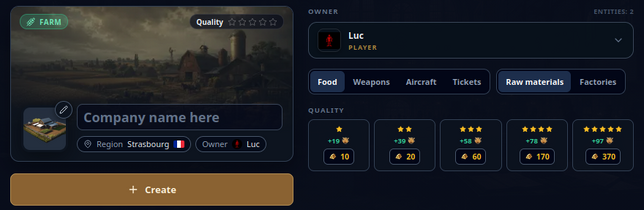 Company creation
-
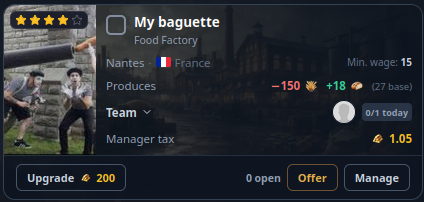 Upgrade confirmation
-
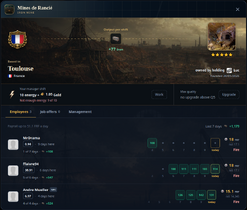 Employee management
-
 Manager-work example
-
 Finding a job
-
 Comparing job offers
-
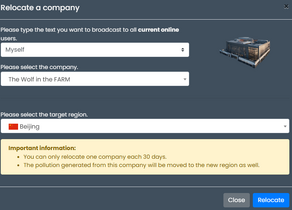 Relocation example


Rules reviewed against the game backend on 12 October 2026. Production settings, studies, taxes and regional conditions can change the final quote. Related guides: Work · Job Market · Storage · Region Buildings · Pollution.