Creating an Account: Difference between revisions
Jump to navigation
Jump to search
No edit summary |
No edit summary |
||
| Line 1: | Line 1: | ||
<h1><div style="margin:auto 0;"><strong>🌟 Creating an <span style="color: #478ccb;">Account</span> 🌟</strong></div></h1> | <h1><div style="margin:auto 0;"><strong>🌟 Creating an <span style="color: #478ccb;">Account</span> 🌟</strong></div></h1> | ||
<ul> | <ul> | ||
<li>First step is to create an account by click on the REGISTER.[[File:Register web.png]] | <li>First step is to create an account by click on the REGISTER.</li> | ||
<li>You need to provide: | [[File:Register web.png]] | ||
<ul> | <li>You will need to provide: | ||
<li>Username - this will be your in-game name.</li> | <ul> | ||
<li>Email - must be a valid email address where you will receive your account activation.</li> | <li>Username - this will be your in-game name.</li> | ||
<li>Password - Choose a strong password and don't forget it :) You will need to write it in the next textbox too.</li> | <li>Email - must be a valid email address where you will receive your account activation.</li> | ||
<li>Promotional Code - This is not required for the Sign Up, fill it if you have one.</li> | <li>Password - Choose a strong password and don't forget it :) You will need to write it in the next textbox too.</li> | ||
<li>At the end you need to accept the Terms and Conditions and Privacy Policy (after you read them all), by checking the box.</li> | <li>Promotional Code - This is not required for the Sign Up, fill it if you have one.</li> | ||
<li>Click on the Sign Up button to receive the activation email.</li> | <li>At the end you need to accept the Terms and Conditions and Privacy Policy (after you read them all), by checking the box.</li> | ||
[[File:SignUpWeb.png]]</ | <li>Click on the Sign Up button to receive the activation email.</li> | ||
[[File:SignUpWeb.png]] | |||
</ul> | |||
</ul> | </ul> | ||
Revision as of 18:04, 9 August 2025
🌟 Creating an Account 🌟
- First step is to create an account by click on the REGISTER.
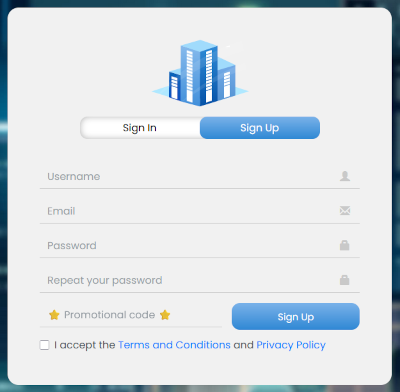
- You will need to provide:
- Username - this will be your in-game name.
- Email - must be a valid email address where you will receive your account activation.
- Password - Choose a strong password and don't forget it :) You will need to write it in the next textbox too.
- Promotional Code - This is not required for the Sign Up, fill it if you have one.
- At the end you need to accept the Terms and Conditions and Privacy Policy (after you read them all), by checking the box.
- Click on the Sign Up button to receive the activation email.